Application to streamline coding and development tasks
Visual Assist is a software bundle which is designed to improve upon the existing functionalities in Microsoft Visual Studio. Developed by Whole Tomato Software, this application can expedite many of the challenging coding requirements associated with modern programming and bench-testing tasks.
Top Recommended Alternative

Features to enhance developmental productivity
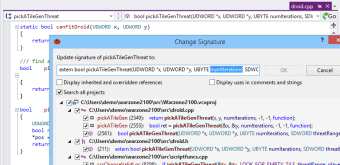
Visual Assist is an IDE plugin which has been particularly targeted towards the advanced development & IT sector, as it offers up a plethora of high-end features which are not often found within generic, legacy coding packages and Visual C++. Whole Tomato Software claims that the primary purpose is to augment the features currently found within the Microsoft Visual Studio Bundle. For example, it boasts many additional navigation capabilities, such as GoTo Member and GoTo Related, which are not present within Visual Studio. Other advancements include the ability to encapsulate fields, input variables and access enhanced coding assistance. This tool is particularly beneficial in regards to debugging assistance and code generation, making it ideal for coding professionals who are familiar with the fundamental aspects of Microsoft Studio and require a more thorough developer interface. The features mentioned above can be especially beneficial for IT specialists who work in fast-paced environments.
Advanced options within a user-friendly package
Visual Assist is quite versatile, as it can work with C, C++ and C# programming languages. This is a great feature for IT specialists who might be required to switch between different coding parameters depending on the task at hand. As should be expected, there are a number of keyboard shortcuts which will expedite common coding requirements. These include opening files, finding a symbol within a string of text, opening a corresponding file, and accessing re-factoring menus. It is likewise possible to employ VA hashtags and to rename definitions if required. The installation process is also very clean and straightforward. Once all iterations of Visual Studio have been closed, the user will simply activate the .EXE installation option and select which IDEs will be included. Visual Assist will then be launched. Finally, "tips of the day" are included within its framework.
An efficient framework for modern coding specialists
It seems as if Whole Tomato Software has left little to chance when dealing with the needs of development & IT professionals, its technical enhancements cannot be denied. It should also be mentioned that a 14-day free demo is available before the user will be required to make a purchase.










.png)